Enhancements in Android Developer Tools Unveiled at Android Dev Summit
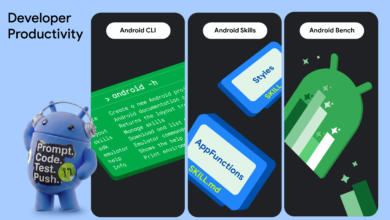
This year’s Android Dev Summit showcased significant advancements in Android developer tools, aimed at boosting productivity for developers and their agents. Whether you favor Android Studio or the command line interface, the objective remains consistent: to equip developers with the necessary tools and knowledge for building high-quality Android applications more efficiently.
Key Updates in Android Studio
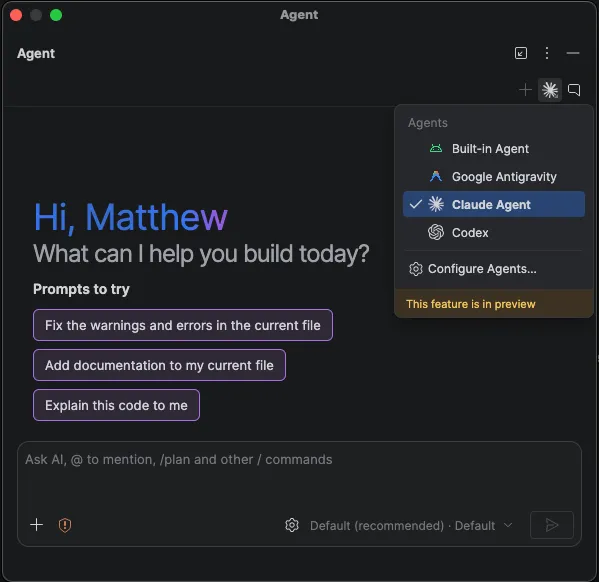
Android Studio has long been the preferred environment for professional Android developers, and recent updates have further solidified its status. A highlight of this year’s summit was the introduction of the Bring Your Own Agent (BYOA) feature, now stable in Android Studio Rabbit 2. This allows developers to integrate over 40 compatible coding agents directly into their workflow.
- Agent Flexibility: Developers can now choose the agents and models that best fit their project needs, including those that their teams already utilize.
- Seamless Integration: Agents gain access to Android Studio’s robust features, such as project structure understanding, symbol resolution, and Compose Preview rendering.
Improved Code Review Process
One of the challenges developers face is reviewing changes made by AI agents. Android Studio now offers an enhanced code review experience, enabling users to initiate review sessions from pending agent changes or Git windows. This feature generates a report highlighting potential issues, making it easier to understand and rectify changes made by the agent.
- AI-guided Walkthroughs: Developers can request guided assistance for understanding complex changes.
- Automated Issue Resolution: Agents can now identify and fix issues during the review process, streamlining development.
Introducing Android Bench 2.0
To assist developers in selecting the right models for their projects, Android Bench 2.0 has been launched. This leaderboard evaluates various large language models (LLMs) based on their performance in real-world Android development tasks. Tasks such as UI migration and app creation are assessed for effectiveness, cost, and time efficiency.
New Emulator Capabilities
The summit also revealed advancements in emulators for extended reality (XR) devices. Developers can now customize their testing environments using 360-degree photos or feeds from connected cameras, allowing for realistic location testing. Additionally, new hardware indicators for microphones and cameras have been introduced, along with improvements to the Pairing Wizard for easier virtual device pairing.
Streamlined UI Migration
Migrating user interfaces from XML Views to Compose has typically been a labor-intensive task. However, the new Migration Assistant in Android Studio simplifies this process significantly. By right-clicking on any XML layout, developers can initiate an AI-driven migration that converts layouts and view-binding code into idiomatic Compose.
Enhanced Command Line Interface (CLI)
The Android CLI, a tool-first interface, has received updates that enhance its utility for agents. This interface now supports physical device streaming, allowing agents to test applications on real devices remotely from a Google device lab. The new command, android device hub, enables interaction with local and remote devices without the need for an integrated development environment (IDE).
Conclusion
The updates presented at the Android Dev Summit signal a commitment to enhancing developer productivity through improved tools and features. With the integration of AI agents, streamlined workflows, and advanced testing capabilities, developers can look forward to a more efficient app development process.
Source for the original facts: Original source.